
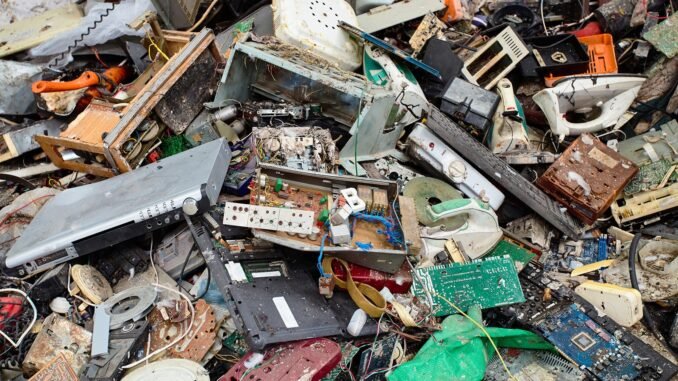
Learning how do I safely sell or recycle my old electronics matters for two reasons: your personal data and the planet. Old devices contain everything from banking logins to family photos, and they also contain lead, mercury, and other nasties that should never reach a landfill. I clear out a drawer of old tech every year, and the process below maximizes your money while keeping your data safe and e-waste out of the ground.
How Do I Safely Sell or Recycle My Old Electronics? Step 1: Wipe Your Data (Non-Negotiable)
Do this before the device leaves your hands, no exceptions:
- Back up anything you want to keep. Photos, documents, authenticator codes, 2FA recovery keys. Once wiped, it is gone.
- Sign out of everything: iCloud/Apple ID, Google account, Samsung account. On iPhone, this disables Activation Lock, without this step the device is a brick to the next owner.
- Unpair accessories: Apple Watch, Bluetooth pairings.
- Remove SIM and memory cards. Obvious, yet constantly forgotten.
- Factory reset: iPhone: Settings > General > Transfer or Reset > Erase All Content. Android: Settings > System > Reset > Erase all data. Windows: Settings > Recovery > Reset this PC (choose “Remove everything” and enable data wiping). Mac: Erase via Disk Utility in Recovery Mode, then reinstall macOS.
- For extra-sensitive data (business laptops, tax documents), do a secure erase: overwrite the drive with tools like DBAN for HDDs, or use the manufacturer’s Secure Erase for SSDs. Standard resets are fine for most personal use, but secure erase is the gold standard.
- Remove the device from your Apple ID / Google account device lists afterward.
Where to Sell: Most Money to Least Effort
- eBay / Swappa (most money): Swappa is purpose-built for used tech with strict listing standards and no selling fees for buyers; sellers pay a small fee. Expect the highest prices here, 20-40% more than trade-in programs. Worth it for phones and laptops under 3 years old.
- Facebook Marketplace / Craigslist (fast, local): No fees, cash in hand, but meet in public places and only accept cash or instant-verified payment. Great for bulky items (TVs, printers) that are expensive to ship.
- Trade-in programs (easiest): Apple Trade In, Samsung, Best Buy, Amazon, and carriers all offer instant quotes. You will get 20-30% less than private sale, but it takes five minutes with zero hassle or stranger meetings.
- Decluttr / ItsWorthMore (middle ground): Mail your device, get paid after inspection. Less than eBay, more than carrier trade-in, minimal effort.
- What sells well: iPhones (hold value best), iPads, MacBooks, game consoles, cameras. What barely sells: Old printers, CRT monitors, phones over 5 years old, anything with a cracked screen unless priced for parts.
How to Price It Right
- Search eBay sold listings (not active listings) for your exact model and condition. Sold prices are reality; asking prices are fantasy.
- Be brutally honest about condition. “Good” means light wear; “Fair” means visible wear but fully functional.
- Include the charger and original box if you have them, they add 10-15% to the price.
- Photograph flaws clearly. Honest listings sell faster and avoid returns.
Where to Recycle (When It Is Not Worth Selling)
- Best Buy: Free recycling for most electronics regardless of where you bought them, including TVs and monitors. The easiest option in America, full stop.
- Staples / Office Depot: Free recycling for many items, small fee for some monitors.
- Manufacturer programs: Apple (free recycling + trade-in credit), Dell, HP, and Epson all run takeback programs, often with prepaid shipping labels.
- Municipal e-waste events: Most cities run periodic collection events; check your city website.
- Call2Recycle: For batteries specifically, drop-off locations everywhere. Tape battery terminals before recycling, loose lithium batteries cause fires in collection bins.
- Never put electronics in the trash. It is illegal in many states (California, New York, and others ban e-waste from landfills), and the heavy metals genuinely poison groundwater.
Special Cases
- Devices with swollen batteries: Handle carefully, do not puncture, take directly to Best Buy or a municipal hazardous waste facility. Tell them about the swelling.
- Old hard drives: If selling a computer without wiping securely makes you nervous, remove the drive and keep or destroy it (a few whacks with a hammer is theatrically effective and genuinely works).
- Company devices: Check with IT before selling or recycling. Many employers require certified data destruction.
- Donate working devices: Schools, shelters, and nonprofits (like Cell Phones for Soldiers or local Goodwill electronics programs) accept working phones and laptops. Wipe them first, same as selling. Your tax deduction may beat the resale price on older items.
The EPA’s electronics recycling resources can help you find certified recyclers (look for R2 or e-Stewards certification) that guarantee your e-waste is actually recycled responsibly, not dumped overseas.
The Bottom Line
To safely sell or recycle old electronics: back up and factory-reset every device (signing out of accounts first), sell working tech on Swappa/eBay for top dollar or trade in for convenience, recycle the rest free at Best Buy or manufacturer programs, and never trash e-waste. Price honestly using sold listings, tape battery terminals, and donate working devices you cannot sell. Your data stays safe, your wallet gets a bonus, and nothing toxic hits a landfill.
Quick Answers to Common Questions
How do I wipe a phone that will not turn on?
If the phone is truly dead, you cannot software-wipe it, which is why encryption matters: modern iPhones and Androids encrypt storage by default, so a dead phone’s data is effectively unreadable without your passcode. For extra assurance, remove the storage if accessible, or take the device to a recycler that offers certified data destruction. Physical destruction (drilling through the storage chip area) is the ultimate guarantee.
Can I sell a phone with a cracked screen?
Yes, but price it accordingly. Cracked-screen phones sell for parts or repair on eBay at 30-50% of working value. Sometimes repairing first nets more: a $100 screen repair on a phone worth $300 working versus $120 as-is means repair-then-sell profits $80. Do the math per device; for high-value recent phones, repair usually wins.
What should I do with old chargers and cables?
Keep one or two spares of each type you use; recycle the rest. Best Buy and Staples accept cables and chargers for free e-waste recycling. Usable chargers can go to donation centers or Buy Nothing groups. That tangled drawer of decade-old proprietary chargers for devices you no longer own is pure clutter; let it go.
Is it better to donate or sell old electronics?
Sell if the item has meaningful value (recent phones, working laptops under 5 years old); the cash usually exceeds the tax deduction. Donate working but low-value items (older tablets, monitors) where selling hassle exceeds returns. Either way, wipe data identically. Donation also keeps usable tech in circulation, which is the most environmentally friendly outcome after continued use.
Leave a Reply