
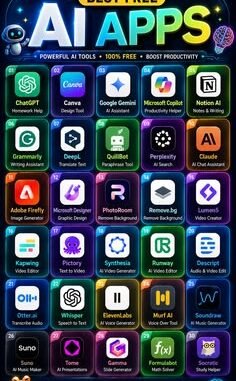
As a small business owner, you don’t have a marketing department, a copywriter, a data analyst, or an IT team. What you do have is 47 things to do before lunch. This is exactly why AI tools are such a big deal for small businesses — they fill the roles you can’t afford to hire. But with hundreds of tools launching every month, the real question is: what are the best free AI tools for small business owners — the ones that actually save time and money, not the ones that just demo well?
I’ve tested dozens of these with small business use cases specifically in mind. My criteria were strict: genuinely useful free tier (not a 7-day trial masquerading as “free”), no credit card required to start, and practical for a non-technical owner. Here are the winners, organized by the jobs they do for you.
What Are the Best Free AI Tools for Small Business Owners? Start With Writing
ChatGPT (free tier) — your all-purpose assistant
The free version of ChatGPT handles an absurd range of business tasks: drafting emails, writing product descriptions, brainstorming blog topics, summarizing long documents, creating social media captions, even role-playing difficult conversations before you have them. Is it perfect? No — you’ll edit its output. But going from blank page to 80%-done draft in 30 seconds changes how much you can produce in a day. Our guide on using AI to write emails faster shows specific techniques.
Claude (free tier) — the careful writer
Anthropic’s Claude tends to produce more natural, nuanced writing than ChatGPT’s free tier — better for customer-facing copy, thoughtful emails, and anything where tone matters. Many owners I know use ChatGPT for brainstorming and Claude for polishing. Having both free accounts costs nothing and covers more ground.
Grammarly (free) — your editor
Catches the typos and awkward phrasing in your emails, proposals, and website copy before customers see them. The free tier covers grammar, spelling, and basic tone suggestions. For a business where every email represents your brand, this is non-negotiable.
Marketing and Content
- Canva (free tier) with Magic Studio: AI background remover, magic resize, and text-to-image generation built into the design tool you probably already use. Social posts, flyers, and ads without a designer. Pair it with our guide on creating a professional logo on a budget for your visual identity.
- CapCut (free): AI auto-captions, background removal, and templates for short-form video. If you’re doing TikTok, Reels, or YouTube Shorts for your business, this removes the editing learning curve.
- Mailchimp (free up to 500 contacts): AI subject-line suggestions and send-time optimization for your email marketing. Email remains the highest-ROI marketing channel for small businesses.
Customer Support
- Tidio (free tier): AI chatbot for your website that answers common questions 24/7 and hands off to you when it’s stuck. For a small shop, this means never missing a customer question at 11pm again. Our deeper guide on using AI for customer support walks through setup strategy.
- HubSpot CRM (free): Not strictly AI, but its free tier includes AI email writing assistance and it’s the best free CRM available. Track every customer interaction in one place instead of in your head.
Meetings, Notes, and Organization
- Otter.ai (free tier): Transcribes meetings in real time — 300 minutes/month free. Never take meeting notes again; just search the transcript later. A major time-saver for client calls and team meetings.
- Notion AI (limited free): Summarizes notes, drafts documents, and organizes your business wiki. The free tier includes enough AI responses to handle weekly planning and documentation.
- Google’s Gemini (free): Built into Gmail and Docs if you use Google Workspace — summarizing long email threads and drafting documents without switching apps.
Images and Creative
- Microsoft Designer / Image Creator (free): Powered by DALL-E, free with a Microsoft account. Generate custom images for blog posts, social media, and ads. Our guide to the best free AI image generators for beginners compares the options in detail.
- Leonardo.ai (free tier): Daily free credits for higher-quality image generation — better for product mockups and branded visuals.
How to Actually Get Value (Not Just Collect Tools)
The trap: signing up for 15 tools and using none of them well. Here’s my recommended approach:
- Start with ONE pain point. What’s eating most of your time — writing, customer questions, content creation? Pick the tool for that problem only.
- Use it daily for two weeks. AI tools have learning curves — mostly in learning how to prompt them well. Our guide on writing better AI prompts will dramatically improve your results with any of these.
- Measure the time saved. If a tool saves you 3 hours a week, that’s 150+ hours a year. That’s the ROI calculation that matters.
- Add tools one at a time. Only adopt the next tool when the first is a settled habit.
For a broader view of what’s available, the SBA’s small business technology resources are worth browsing alongside any AI toolkit decisions.
The Honest Caveats
- Free tiers have limits. You’ll hit usage caps eventually. That’s fine — by then you’ll know whether the paid version is worth it.
- Don’t feed them sensitive data. Customer personal info, financial details, trade secrets — keep those out of free AI tools. Our guide on AI chatbot privacy explains why.
- Always review output. AI confidently produces wrong information. Anything customer-facing or legally significant gets human eyes. Every time.
- Free tools change. Pricing and features shift constantly in this space. The tools above were solid at last check, but verify current free-tier terms before committing your workflow.
FAQs
Are free AI tools actually safe for business use?
Mostly, with one big caveat: read the terms on data usage. Some free tiers use your inputs to train their models, which means you shouldn’t paste sensitive customer data, financials, or trade secrets into them. Paid business tiers usually offer data privacy guarantees that free ones don’t. A practical rule: use free tools for drafting and brainstorming, but review anything customer-facing carefully and keep confidential information out of tools you haven’t vetted.
What’s the first AI tool a small business should adopt?
A good writing assistant, because writing is the universal bottleneck. Emails, product descriptions, social posts, website copy, proposals — a writing tool speeds up all of it from day one. It’s also the lowest-risk place to start: you review everything before it goes out, so mistakes get caught. Once you’re comfortable, add a meeting transcriber or a design tool. One tool at a time beats a dozen tools you never learned.
Can free AI tools really replace paid software?
Sometimes, and sometimes they complement it. A free AI writing tool can replace a freelance copywriter for first drafts, and a free design tool can handle simple social graphics. But they won’t replace your accounting software or your CRM — those need reliability, integrations, and support that free tools don’t offer. Think of free AI tools as replacements for manual effort and expensive one-off services, not as replacements for your core business systems.
How do I stop my team from becoming dependent on AI output?
Make review a formal part of the workflow, not an afterthought. AI is a starting point generator, not a decision maker — require a human sign-off on anything external, and spot-check internal work regularly. Train your team to edit AI drafts critically rather than accepting them. The businesses that get burned are the ones where AI output flows straight to customers; the ones that thrive treat it as a rough draft that a skilled human finishes.
The bottom line: a small business owner in 2026 can assemble a free AI toolkit — writing assistant, editor, designer, video editor, chatbot, transcriber, CRM — that collectively replaces thousands of dollars in services and hours of weekly drudgery. Start with your biggest time-sink, master one tool, and build from there. The businesses pulling ahead aren’t the ones with the most tools; they’re the ones that actually integrated one or two into their daily routine.
Leave a Reply