
The moment you sell your first product online to someone in another state, you’ve entered the world of multi-state sales tax — and honestly, most new sellers don’t think about it until an accountant or a panicked Google search brings it up. If you’re asking how do I collect sales tax for online sales in different states, you’re already ahead of a lot of sellers who just ignore it and hope for the best. Hope is not a tax strategy. Let’s make this manageable.
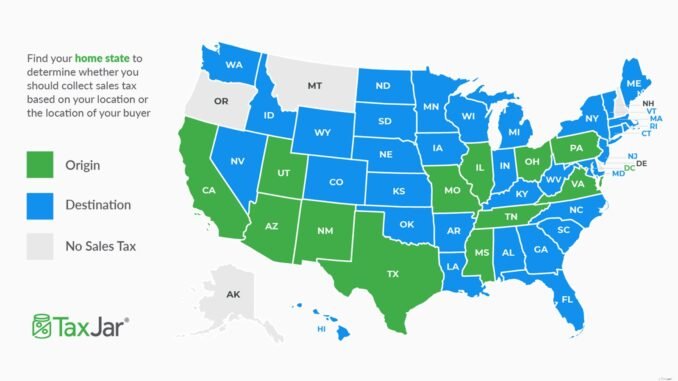
Here’s the core idea in plain English: sales tax is charged based on where your customer is, not where you are. But you only have to collect it in states where you have what tax people call “nexus” — basically, a meaningful connection to that state. After the 2018 Supreme Court decision in South Dakota v. Wayfair, having a physical store or warehouse isn’t required anymore. Selling enough into a state can create “economic nexus” all by itself, which is why even a small Shopify store can suddenly owe sales tax in 15 states.
How Do I Collect Sales Tax for Online Sales in Different States? Start With Nexus
Nexus is the trigger. If you have it in a state, you must register there, collect the right tax rate, and file returns. Here’s what creates nexus in most states:
- Physical presence: An office, store, warehouse, employee, or even inventory sitting in an Amazon fulfillment center (FBA sellers, this one’s for you — Amazon stores your stuff in warehouses across the country).
- Economic nexus: Selling over a threshold into the state — most commonly $100,000 in sales or 200 transactions per year, though some states use different numbers. A handful of states have no transaction threshold at all.
- Click-through or affiliate nexus: Less common now, but some states still have rules about affiliates referring sales to you.
The practical first step: list every state where you have any physical footprint (including where your inventory sits) and every state where your sales might be approaching the threshold. For most sellers just starting out, that’s maybe 2–5 states, not 50.
Registering for Sales Tax Permits
Once you’ve identified your nexus states, you register for a sales tax permit (sometimes called a seller’s permit) in each one. This is done through each state’s department of revenue website — there’s no federal one-stop shop, which is the annoying part. Registration is usually free or under $50 per state, and most states process online applications in a few days to a few weeks.
Do not collect sales tax in a state where you aren’t registered. Collecting without a permit is actually illegal in many states — the logic being that you’re holding the state’s money without authorization. Register first, then collect.
Marketplace facilitator laws: the good news
If you sell on Amazon, eBay, Etsy, or Walmart Marketplace, here’s a relief: every state with a sales tax now has “marketplace facilitator” laws. That means the marketplace itself collects and remits sales tax on your behalf for orders placed through their platform. You generally do not need to collect separately for those sales. This does not cover sales through your own website (Shopify, WooCommerce, Squarespace) — those are on you.
Figuring Out the Right Tax Rate
This is where sellers’ eyes glaze over, because US sales tax isn’t one rate per state — it’s thousands of local jurisdictions. The rate depends on the exact delivery address: state + county + city + sometimes special districts. A customer in one ZIP code might pay 6% while someone two miles away pays 9.25%.
You have two realistic options:
- Let your platform handle it: Shopify, WooCommerce (with the TaxJar or Avalara plugin), and BigCommerce all have built-in sales tax engines that calculate the right rate by address automatically. Turn this on and verify it’s set to collect only in your nexus states. This is what 90% of small sellers should do.
- Use a dedicated service: TaxJar (starts around $19/month) and Avalara are built exactly for this. They track your nexus exposure, auto-file returns in every state, and handle rate calculations. If you’re registered in 10+ states, the monthly fee pays for itself in saved headaches and accountant hours.
What you should not do: hard-code a flat rate like “8% for everyone.” You’ll overcharge some customers (angry emails, abandoned carts) and under-collect in others (you owe the difference out of pocket).
Filing and Paying: The Ongoing Part
Collecting is only half the job. Every state assigns you a filing frequency — monthly, quarterly, or annually — based on your sales volume there. You file a return showing what you collected and send the money to the state. Even in months with zero sales in a state, most states still want a “zero return” filed. Miss filings and the penalties stack up fast: typically 5–10% of the tax due per month, plus interest.
Set calendar reminders for every state’s due dates, or let TaxJar/Avalara auto-file for you. I’ve seen too many sellers nail the collection part and then get hit with $500 in penalties because they forgot a quarterly filing in a state where they owed $38.
Keep records like your business depends on it
States can audit you going back 3–4 years. Keep records of every sale by state, every exemption certificate (for wholesale/resale customers — get these in writing before you skip collecting), and every return you filed. Your e-commerce platform plus your tax software should cover this, but download backups quarterly. The SBA’s tax guide for small businesses has a good overview of record-keeping expectations.
Common Traps to Avoid
- Digital products and services: Whether ebooks, courses, or SaaS are taxable varies wildly by state. Some tax them, some don’t, some tax only parts. Check each nexus state’s rules.
- Drop shipping: If your supplier ships from a state where you have nexus, you may owe tax there even if the customer is elsewhere. This gets complicated — worth a consultation with a sales tax specialist if drop shipping is your model.
- Ignoring thresholds: Economic nexus thresholds are based on the prior or current calendar year depending on the state. Track your per-state sales monthly so you’re not surprised.
- Thinking it’s income tax: Sales tax is separate from the income tax you pay on profits. The IRS small business center covers federal obligations, but sales tax is purely a state matter.
Sales tax compliance gets easier once the system is set up — the painful part is the initial registration and configuration. If you’re also sorting out your broader finances, our guides on tracking business expenses without an accountant and what counts as a good profit margin for a small retail business pair well with this one.
The bottom line: figure out your nexus states, register before you collect, automate rate calculation through your platform or a service like TaxJar, and never miss a filing. It’s unglamorous work, but doing it right from the start is infinitely cheaper than cleaning up penalties later.
Leave a Reply