
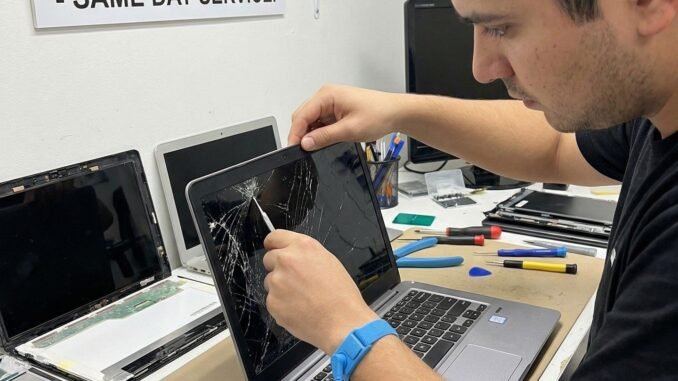
A cracked laptop screen is gut-punch territory, and the first question is always how much does it cost to repair a cracked laptop screen. I have been through this twice, once with a MacBook and once with a ThinkPad, and the price difference was staggering. Laptop screen repair costs range from $100 to over $600 depending on your machine, and whether repair makes sense at all depends on the laptop’s age and value.
How Much Does It Cost to Repair a Cracked Laptop Screen? 2026 Price Ranges
- Budget Windows laptops: $100-$200 at independent shops. Replacement panels for common models (HP Pavilion, Acer Aspire, Lenovo IdeaPad) are cheap and plentiful.
- Mid-range Windows laptops: $150-$300. Touchscreens and higher-resolution panels cost more.
- Premium Windows (Dell XPS, Surface, ThinkPad X1): $250-$450. Thinner panels, tighter tolerances, pricier parts.
- MacBook Air: $300-$500 at Apple ($379-$479 depending on model); $200-$350 at independent shops.
- MacBook Pro 14/16: $500-$800+ at Apple. The mini-LED displays are extraordinarily expensive. AppleCare+ drops this to $99, which is the best argument for AppleCare I know.
- Gaming laptops (144Hz+ panels): $200-$400. High-refresh panels cost more than standard 60Hz ones.
Labor typically runs $50-$100 of the total at independent shops; the rest is the panel itself. Most repairs take 1-2 hours if the shop has your panel in stock, or 3-5 days if they must order it.
What Drives the Price Up or Down
- Panel type: Standard 1080p LCDs are cheapest. Touchscreens add $50-$100. OLED and mini-LED panels (MacBook Pro, high-end Dells) can cost more than some entire laptops.
- Resolution and refresh rate: 4K and 144Hz+ panels cost significantly more than basic 1080p 60Hz.
- Model popularity: Common models have cheap, abundant parts. Obscure or very new models mean expensive, hard-to-find panels.
- Apple vs. everything else: Apple’s parts pairing and calibration requirements make MacBook screens pricier to replace properly. Independent shops can do it cheaper, but verify they handle True Tone calibration.
- Just the glass vs. the whole assembly: Some laptops allow glass-only replacement (cheaper); most modern thin laptops need the full display assembly (pricier).
DIY Screen Replacement: Worth It?
Replacement panels run $40-$150 on Amazon and laptop-screen specialists for common Windows models, and iFixit has free step-by-step guides. I replaced a ThinkPad screen myself in 45 minutes with a $70 panel, it is genuinely one of the easier laptop repairs: usually just bezel clips and a ribbon cable.
But know the risks: ordering the wrong panel is the number one DIY failure (match the exact model number on the back of your old panel, not just the laptop model), thin bezels crack easily during disassembly, and MacBooks are not DIY-friendly for screens. My rule: DIY for standard Windows laptops with iFixit guides rated Easy or Moderate; professional for MacBooks, touchscreens, and anything glued together.
Repair Shop vs. Manufacturer
- Manufacturer (Apple, Dell, HP): Most expensive, but genuine parts, proper calibration, and warranty preserved. Worth it for laptops under warranty or AppleCare+ ($99 screen repair is a steal).
- Independent shops: 30-50% cheaper, often same-day. Ask about part quality (OEM vs. compatible), warranty on the repair (90 days minimum), and whether features like True Tone/touch still work after.
- Mail-in services: Cheapest option, but 1-2 weeks without your laptop. Only sensible if you have a backup machine.
When Repair Is NOT Worth It
- The laptop is 5+ years old and worth less than $300. A $250 repair on a $200 laptop is bad math.
- Multiple things are broken (screen + battery + keyboard). Repair costs stack fast.
- It lacks an SSD or has under 8GB RAM. Put the repair money toward a modern machine instead.
- The 50% rule: If repair costs more than half the laptop’s current used value, replace the laptop.
In these cases, consider selling the broken laptop for parts ($50-$150 on eBay), recovering your data (the hard drive/SSD is almost certainly fine), and buying new or refurbished.
Preventing the Next Crack
- Never pick up the laptop by the screen. This flexes and cracks panels more than drops do.
- Do not close the lid on pens, earbuds, or crumbs. The number one cause of “mystery cracks.”
- Use a padded sleeve ($15-$25), not just a backpack compartment.
- Do not stack things on a closed laptop. Pressure cracks are depressingly common.
- Consider accidental damage protection on your next laptop. Dell, Lenovo, and Apple all offer it, and one screen repair pays for years of coverage.
The Bottom Line
A cracked laptop screen costs $100-$200 to repair on budget Windows machines, $150-$350 mid-range, and $300-$800+ for MacBooks, with DIY panels as cheap as $40-$150 for common models. Get quotes from both the manufacturer and a reputable independent shop, apply the 50% rule before repairing an old machine, and if you DIY, match the exact panel model number. Then buy a padded sleeve, because the cheapest screen repair is the one you never need.
Quick Answers to Common Questions
Can I use my laptop with a cracked screen by connecting a monitor?
Yes, and it is a great stopgap. Connect an external monitor via HDMI, and most laptops will display on it even with a destroyed internal screen (use Win+P on Windows or close the lid on Mac with external power connected). This buys you time to get quotes, order parts, or finish critical work. A used 24-inch monitor costs $50-$80, far less than a rushed repair.
Does homeowners or renters insurance cover cracked laptop screens?
Sometimes, but check your deductible first. With typical $500-$1,000 deductibles, a $200 screen repair is not worth claiming, and claims can raise premiums. Some credit cards (especially premium ones) include purchase protection covering accidental damage for 90-120 days after purchase; check your card benefits before paying out of pocket for a recently bought laptop.
How do I find the exact replacement screen model?
Remove the old panel (following an iFixit guide) and read the model number on the sticker on its back, something like “B156HAN02.1” or “LP140WFH.” Search that exact number when ordering. Laptop model alone is unreliable because manufacturers use multiple panel suppliers per model with different connectors. The panel’s own model number is the only sure match.
Is a cracked touchscreen more expensive to repair?
Yes, typically $50-$100 more than the non-touch equivalent, because the digitizer layer adds cost and complexity. Touch functionality must also be recalibrated after replacement, which some shops charge extra for. Verify touch works perfectly before leaving the shop; dead touch zones are the most common post-repair complaint on touchscreen laptops. For the DIY route, iFixit’s free repair guides cover most models step by step.
Leave a Reply