
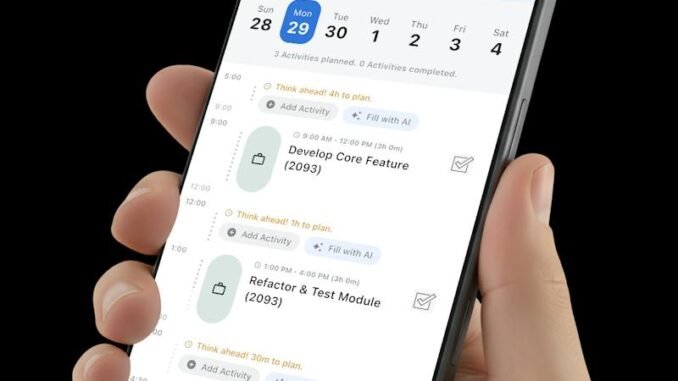
Your calendar is full, your to-do list is longer, and somehow the important stuff still doesn’t get done. The problem usually isn’t discipline — it’s that traditional calendars are dumb containers. They hold appointments but they don’t think. That’s the gap AI scheduling apps fill: they don’t just store your day, they help you plan it. But with a new “AI planner” launching every week, what is the best AI app for planning a daily schedule? I’ve tested the leading options, and the answer depends on how you work — so let’s match the app to the person.
First, what “AI scheduling” actually means in practice. These apps do things a paper planner can’t: automatically find time for your tasks around fixed meetings, reschedule everything when something runs long, learn when you’re most productive and protect those hours, and turn a messy brain-dump into an organized day. The best ones feel less like software and more like a really good executive assistant.
What Is the Best AI App for Planning a Daily Schedule? The Top Contenders
Motion — best for busy professionals who live in meetings
Motion is the most fully “AI” of the bunch. You dump in your tasks with deadlines and priorities, connect your calendar, and Motion builds your entire day automatically — scheduling deep work around meetings, reordering when priorities shift, and rebuilding the plan when (not if) things change. It’s genuinely impressive: users routinely report reclaiming 5+ hours a week. The catch: it’s $19–$34/month, and some people find the auto-scheduling too rigid — it plans your day, and you’d better like its plan. Best for: professionals with packed calendars who want the thinking done for them.
Reclaim.ai — best free-ish option for calendar defense
Reclaim focuses on one thing brilliantly: protecting time for what matters. It auto-schedules your habits (lunch, exercise, focus time), finds the best slots for tasks, and defends your calendar against meeting creep. The free tier is genuinely useful; paid starts around $10/month. It integrates deeply with Google Calendar. Best for: people whose calendars get eaten by other people’s meetings.
Sunsama — best for mindful daily planning
Sunsama takes a calmer approach: each morning, you pull tasks from your tools (Asana, Trello, Gmail, Slack) into a focused daily plan, timebox each one, and reflect at day’s end. The AI assists with planning and estimates rather than fully automating. At $20/month it’s premium-priced, but fans love the ritual — it’s planning as mindfulness, not just optimization. Best for: people who want intentionality, not just efficiency.
Todoist with AI Assistant — best for existing to-do list lovers
If you already live in Todoist, its AI features (task breakdown, prioritization suggestions, natural language scheduling) add intelligence without switching systems. The free tier covers basics; Pro is $5/month. Not as “auto-magical” as Motion, but the gentlest upgrade path. Best for: minimalists who want a smarter list, not a robot overlord.
Google Calendar + Gemini — best free integrated option
If you’re in the Google ecosystem, Gemini’s calendar integration is getting genuinely useful: “find 90 minutes for deep work this week,” summarizing your day, drafting event descriptions. It’s free with a Google account and requires zero new apps. The AI is less autonomous than Motion or Reclaim, but the price (free) and zero learning curve are hard to beat. Best for: everyone already living in Google Calendar who wants a taste of AI planning.
How to Choose: Match the App to Your Problem
- “My calendar is chaos and I need someone to just organize it” → Motion
- “Meetings eat my focus time” → Reclaim.ai
- “I want to be intentional, not just busy” → Sunsama
- “I just want my to-do list to be smarter” → Todoist
- “I want free and simple” → Google Calendar + Gemini
- “I need team scheduling” → Motion or Reclaim (both handle team plans)
Making Any of Them Actually Work
The app matters less than the habit. AI schedulers fail when users treat them as magic — here’s how to get real value:
- Do a weekly review (15 min). Every Sunday or Monday morning, dump all tasks and deadlines into the system. AI can’t plan what it doesn’t know about.
- Be honest about task duration. Everything takes longer than you think — add 25% to your estimates for the first month until the AI learns your real pace.
- Protect one focus block daily. Even 90 minutes of defended deep-work time transforms productivity. Tell the app this block is sacred.
- Let it reschedule without guilt. The whole point of AI scheduling is dynamic replanning. When a meeting runs long, let the system rebuild — don’t manually micromanage.
- Review and adjust weekly. Check what got done vs. planned. If you’re consistently at 60%, you’re overplanning — scale back until you hit 80%+.
Research on time management consistently shows that planning fallacy — underestimating task duration — is the biggest productivity killer; the American Psychological Association’s resources on work productivity are worth exploring if you want the science behind better planning habits.
The Free Alternative That Works Surprisingly Well
Honestly? ChatGPT or Claude plus your regular calendar covers 70% of the value for $0. Each morning, paste your task list and fixed appointments and ask: “Plan my day from 9 to 6. I do deep work best before noon. Include lunch and two 15-minute breaks.” It’s manual, but the planning quality is excellent — and our guide on writing better AI prompts makes it even sharper. For broader productivity, see how to be more productive while working from home.
Quick Answers: AI Scheduling
Is an AI scheduling app worth it over a regular calendar?
If your days are simple, no — a regular calendar plus discipline wins. AI schedulers earn their keep when you’re juggling many tasks with competing priorities: they auto-prioritize, reschedule around conflicts, and protect focus time. Complexity is the use case.
The bottom line: Motion wins for full automation, Reclaim for calendar defense on a budget, Sunsama for mindful planning, and Google’s free Gemini integration for the cost-conscious. But the best AI scheduling app is the one you’ll actually use daily — pick the one matching your biggest pain point, commit for a month, and let the system learn how you really work.
Leave a Reply