
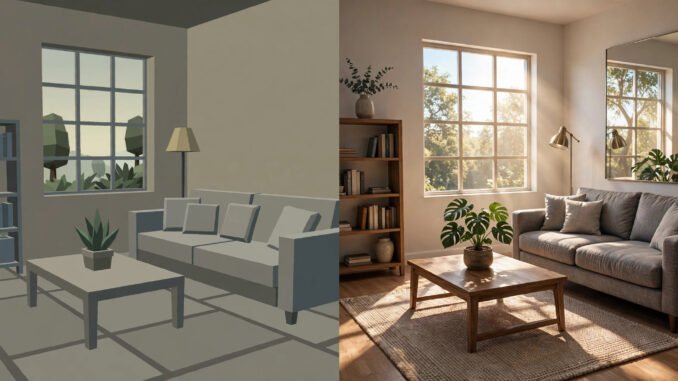
Ray tracing is the phrase on every graphics card box, in every game settings menu, and in half the arguments about which console is more powerful. It sounds like arcane engineering magic, but the core idea is almost childishly simple: instead of faking how light behaves, simulate it. A ray of light leaves a virtual sun, bounces around a virtual room, and lands on a virtual camera — and the computer figures out what each pixel should look like by following that journey. That’s it. That’s ray tracing. Understanding it deeply enough to follow any discussion about game graphics takes an afternoon, costs nothing, and starts with unlearning one thing: almost every pretty game you’ve ever played was lying to you about light.
What Ray Tracing Actually Does
Every image in a 3D game is a question: for each pixel on your screen, what color should it be? Ray tracing answers by reversing real-world optics. In reality, light leaves a source, bounces off surfaces, and some of it reaches your eye. Ray tracing runs that film backward — it shoots rays from the camera out into the scene and traces where they go. When a ray hits a mirror, the algorithm reflects it and keeps going; when it hits glass, it refracts; when it hits a rough wall, it scatters. Shadows appear naturally wherever rays are blocked from reaching a light source. Reflections show whatever the reflected ray actually hits. The beauty is that nobody has to hand-code “make this puddle reflective” — reflection is just what the math does. The price is computation: a single frame might need millions of rays, each bouncing several times, which is why ray tracing was film-studio territory (think Pixar render farms churning for hours per frame) until recently.
Ray Tracing vs. Rasterization: The Old Trick
Traditional game rendering uses rasterization, which is essentially a magnificent pile of cheats. Instead of simulating light, rasterizers draw triangles directly onto the screen and then fake the lighting: baked-in shadows painted by artists, cube maps that approximate reflections, screen-space tricks that only reflect what’s already visible. These cheats got astonishingly good — which is why games looked great for decades without ray tracing. But cheats have tells. Screen-space reflections vanish when the reflected object leaves the frame. Baked shadows can’t move with a dynamic light. Anyone who’s noticed a character’s reflection missing from a mirror in a game has spotted rasterization’s limits. Ray tracing doesn’t approximate; it computes. The newest buzzword, path tracing, goes further still — it traces many rays per pixel with random bounces to simulate global illumination fully, the technique behind the jaw-dropping “overdrive” modes in games like Cyberpunk 2077. If you’re choosing a display to appreciate all this, it helps to know the difference between OLED and LCD screens, since panel tech determines how much of that lighting nuance you actually see.
Why It Matters in 2026
NVIDIA’s RTX cards brought real-time ray tracing to PCs in 2018, and both the PlayStation 5 and Xbox Series X support it — though consoles typically use hybrid approaches, ray-tracing only the reflections or shadows while rasterizing the rest, to protect framerates. The 2026 reality is nuanced: ray tracing at 4K with full path tracing still demands high-end hardware, but “RT lite” implementations are now standard even in mid-range GPUs, and AI upscaling (DLSS, FSR) reconstructs ray-traced frames from fewer rays, making the performance hit manageable. Developers increasingly design lighting around ray tracing from the start rather than bolting it on. The practical upshot for a curious learner: this isn’t a fad. The industry spent forty years faking light because simulation was too expensive; now simulation is affordable, and the fakes are being retired. Learning the concept now is learning the foundation graphics will stand on for the next decade.
Learn It Free: The $0 Curriculum
Here’s the part that costs nothing. Step one: download Blender, the free 3D software, which includes Cycles — a production-quality path-tracing renderer used in actual films. Open the default scene, switch the renderer to Cycles, hit render, and watch real ray-traced global illumination compute on your own machine. Step two: toggle things. Turn off reflective bounces and watch mirrors go black; crank up bounce counts and watch corners brighten as indirect light accumulates. You’re now experimenting with the actual parameters graphics engineers tune. Step three: watch Blender Guru’s free donut-adjacent lighting tutorials or the hundreds of free “ray tracing explained” videos that use Blender demos — seeing a Cornell box render converge from noise to clean image teaches more than any article. Step four: play with Shadertoy in your browser, where tiny programs ray-trace scenes in real time with code you can read. Total cost: zero dollars and one downloaded program.
Do You Need Expensive Hardware?
To understand ray tracing: no — Blender’s CPU rendering works on any modern laptop, just slowly. To play ray-traced games: it helps, but the budget paths are real. Used RTX 3060-class cards regularly sell for under $200 and handle 1080p ray tracing with upscaling enabled. Cloud gaming’s free tiers let you stream ray-traced games without owning the GPU at all. And the settings menus themselves are a free education: toggle ray-traced shadows on and off in any supporting game and screenshot the difference — that A/B comparison teaches the concept faster than any explainer. The one thing not worth buying is anxiety about having the newest card; the underlying math hasn’t changed since the 1980s, and a used mid-range card renders the same physics as a flagship, just slower. Check NVIDIA’s ray tracing resources for official explainers, and if all this graphics talk makes you want to actually play something, these video games worth trying even if you don’t usually play are the perfect low-pressure starting point.
So the best way to understand ray tracing without wasting money is to stop reading about it as a marketing term and start touching it: render one frame in Blender, toggle one setting in a game, watch noise resolve into a mirror. The concept is one sentence — simulate light instead of faking it — and everything else is just watching that sentence get more detailed. The graphics industry spent decades lying beautifully about light. Now it can afford the truth, and you can learn the whole story free.
Frequently Asked Questions
What’s the difference between ray tracing and path tracing?
Ray tracing is the family name for simulating light with rays. Classic ray tracing (Whitted-style) traces one ray per pixel with perfect mirror reflections. Path tracing fires many rays per pixel with randomized bounces to simulate full global illumination — more realistic, much more expensive, and what “overdrive” graphics modes use.
Can my current PC do ray tracing?
Any PC can render ray-traced images in Blender using the CPU — it just takes longer. Real-time ray tracing in games needs an RTX-series (NVIDIA), RX 6000-series or newer (AMD), or Intel Arc GPU. Cloud gaming free tiers offer a no-hardware way to try it.
Does ray tracing work on consoles?
Yes, on PlayStation 5 and Xbox Series X, usually in hybrid form — ray-traced reflections or shadows combined with rasterization, often in a dedicated quality mode at lower framerates. Full path tracing remains a high-end PC thing for now.
Why do ray-traced images start noisy?
Path tracing approximates lighting by random sampling, so early samples look grainy — like a photo taken in the dark. More samples (or AI denoising) average out the noise. Watching a render converge is literally watching statistics do optics.
Is rasterization going away?
Not soon. Hybrid rendering — rasterize the basics, ray-trace the hard parts — is the pragmatic standard, and rasterization remains far cheaper for simple scenes. The trend is toward more ray tracing over time, not an overnight switch.
Leave a Reply