
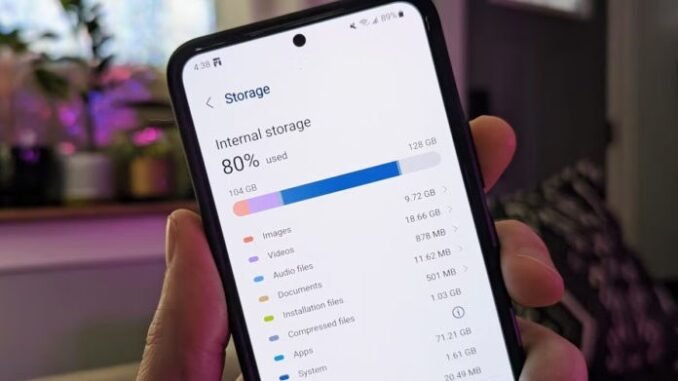
Deciding how much storage do I really need on a new phone matters more than most people realize, because manufacturers charge a brutal premium for it. Apple charges $100 to jump from 128GB to 256GB, and $200 more for 512GB, for a memory chip that costs them a fraction of that. I have watched countless people overpay for 512GB they never fill, and others suffer on 64GB for years. Let us find your actual number.
How Much Storage Do I Really Need on a New Phone? The Quick Answer
- 128GB: Enough for most people in 2026. The sweet spot and the best value.
- 256GB: For heavy photo/video takers, offline media hoarders, and mobile gamers.
- 512GB+: Only for 4K video shooters, professionals, and people who never delete anything and refuse cloud storage.
- 64GB: Avoid on any new phone. The OS alone eats a big chunk, and you will be fighting for space within a year.
Do the Math on Your Current Phone First
Before guessing, check your reality. On iPhone: Settings > General > iPhone Storage shows exactly what you use and what eats it. On Android: Settings > Storage. Whatever number you see, add 20-30% headroom for the next 2-3 years, because apps, photos, and OS updates only grow. If you currently use 70GB, 128GB is comfortable. If you use 110GB, step up to 256GB. This one check beats all generic advice.
What Actually Eats Your Storage
- Photos and videos: The number one hog. A single minute of 4K video is ~400MB. Ten thousand photos is roughly 30-40GB. If you shoot lots of video, this alone justifies 256GB.
- Apps and games: Most apps are small (50-200MB), but games like Genshin Impact or Call of Duty Mobile can exceed 20GB each. Three big games plus normal apps pushes you toward 256GB.
- Offline media: Downloaded Netflix shows, Spotify playlists, and podcasts. A heavy offline library easily hits 20-40GB.
- Messages: Years of shared photos and videos in iMessage or WhatsApp quietly accumulate to 10-20GB. Both apps let you bulk-delete large attachments without losing the conversations.
- The OS itself: iOS/Android plus system data consume 12-20GB before you install a single app. This is why 64GB phones are a trap.
The Cloud Changes Everything
Here is the secret the storage upsell does not want you to think about: cloud storage is absurdly cheaper than phone storage. iCloud+ 200GB costs $2.99/month ($36/year). Google One 200GB is the same. Compare that to Apple’s $100 one-time jump from 128GB to 256GB. With Optimize Storage enabled (iPhone) or Google Photos backup (Android), full-resolution originals live in the cloud while your phone keeps lightweight versions. I keep 90GB of photos accessible on a 128GB iPhone using about 8GB of actual space. The math is not close.
When 256GB or More Genuinely Makes Sense
- You shoot 4K video regularly and edit on the phone.
- You travel without reliable internet and need offline maps, shows, and music.
- You keep phones for 4+ years (storage needs grow ~15-20% yearly).
- You have kids whose videos you will never delete (no judgment, I get it).
- You play several large mobile games simultaneously.
- You use your phone as a work device with large files.
Money-Saving Strategies
- Buy the base model + cloud storage. 128GB phone + $36/year cloud beats a 256GB phone on price for years.
- Clean before you upgrade. Audit your current storage first; you might discover you only use 60GB and the base model is plenty.
- Offload, do not upgrade. iPhone’s Offload Unused Apps and both platforms’ optimized photo storage reclaim tens of gigabytes free.
- Check microSD support. Some Android phones (Samsung dropped it, but Motorola and others kept it) accept cheap microSD cards: 256GB for ~$25. The ultimate storage cheat code.
- Resale reality: Higher-storage phones do resell for more, but rarely enough to cover the original premium. Do not buy storage as an investment.
The Bottom Line
Most people need 128GB on a new phone in 2026, paired with a cheap cloud plan for photos. Step up to 256GB if you shoot lots of video, hoard offline media, play big games, or keep phones for many years. Check your actual current usage before deciding, and remember: a $3/month cloud plan beats a $100+ storage upgrade almost every time.
Quick Answers to Common Questions
Is 128GB enough if I take a lot of photos?
Yes, if you use cloud photo backup with optimized storage. Your full-resolution originals live in iCloud or Google Photos while the phone keeps lightweight versions, so 10,000+ photos consume surprisingly little local space. Without cloud backup, heavy photographers should step up to 256GB. The cloud is the deciding factor, not the photo count.
Can I add storage to my phone later?
On iPhones, no, what you buy is what you get, which is why choosing correctly upfront matters. Some Android phones accept microSD cards (a 256GB card costs around $25), effectively giving you expandable storage for media files. Check for microSD support before buying if expandability matters to you; Samsung flagships dropped it, but many Motorola and mid-range phones kept it.
Does more storage make a phone faster?
Not directly, but a nearly full phone does get slower because the operating system needs free space for caches and temporary files. Keeping 10 to 15 percent of your storage free maintains peak performance. This is an argument for adequate storage, not maximum storage; a 128GB phone with 30GB free runs just as fast as a 512GB phone.
How much storage do mobile games use?
Major mobile games are the storage hogs people underestimate: Genshin Impact and Call of Duty Mobile each exceed 20GB, and popular titles like Roblox and Fortnite run 5 to 10GB. Three or four big games plus normal apps and photos is the most common reason buyers need 256GB. Casual gamers who play one or two titles are fine at 128GB. If photos are your concern, Apple’s iCloud storage support explains the optimized storage option.
Leave a Reply